


Airlines that use Apple Find My
As the 2nd generation of Apple AirTag 2 hits the “online” shelves this week, it is a good time to remember that many of the major airlines also rely on fliers to use these trackers and make use of the Apple Find My feature.
Lost luggage has long been the bane of many ruined trips, but trackers like Apple AirTag have flipped this travel nightmare on its head. It is no longer just “my suitcase is somewhere in the airport”; it is “will the airline actually use the location I can see on my iPhone to recover it faster?”
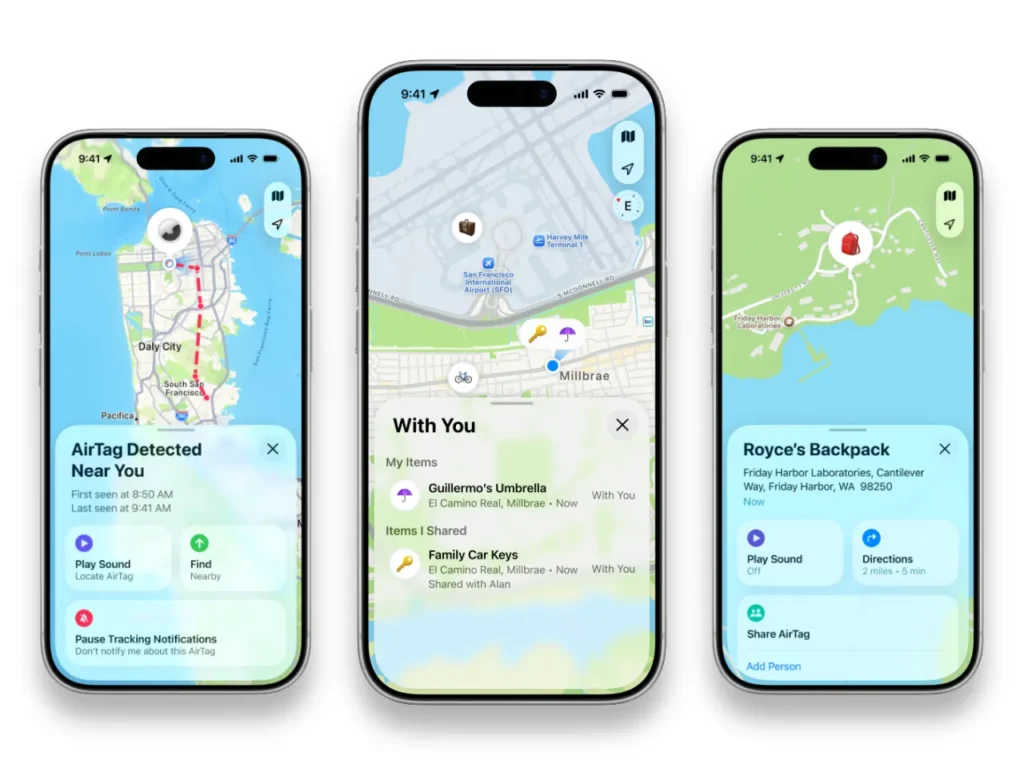
The key feature here is Share Item Location in Apple’s Find My app. It creates a temporary link to the location of an AirTag (or another Find My network accessory) that you can share with a third party, including airlines, so authorised staff can view an updated map instead of relying solely on baggage tracing notes.
Apple also includes guardrails: you can stop sharing at any time, and links auto-expire after 7 days.
Apple Find My is supported by more than 50 airlines, they claim, but the most consistently published, publicly verifiable lists online lean toward 36, which includes all the major carriers.
Apple itself does not provide one single “official directory page” listing every partner airline in one place, so treat this as a practical directory built from publicly available airline guidance and reputable reporting.
Share Item Location is tied to iOS 18.2 or later. If you keep automatic updates on, there’s a good chance you are already on, or beyond, that version. The new AirTag itself requires a compatible iPhone running iOS 26 or later (or iPadOS 26+ on iPad).
A shared link expires after 7 days, or sooner if you stop sharing once your bag is back in your hands.
Your AirTag, or Find my supported tracker, will still appear in Find My, regardless of who you fly with. “Support” here means the airline will accept the Share Item Location link as part of its customer service or baggage recovery process. That might be fully integrated into an app form field, or it might simply be accepted during the delayed-bag workflow.
How to share your AirTag location with an airline
- Open Find My on your iPhone and tap Items
- Select the AirTag that’s in your checked bag
- Turn on Lost Mode, add a phone number or email address
- Tap Share Item Location to generate the link
- File a delayed or missing bag report, then paste the link into the airline’s form or app field
- Stop sharing when you are reunited with your bag; it expires automatically after seven days
Some airlines have published passenger-facing instructions to help travellers use the Find My link.
In other words, you are far less likely to hit a “we don’t know what that is” wall at the baggage desk.
United Airlines
United is very much “app-first” here. It explicitly states that customers can securely share the location of an AirTag or Find My accessory with United agents through the United app, so the link lives in the same place as your delayed bag report.
That matters because it reduces the risk of your tracking link floating around in an inbox instead of being attached to the case your baggage team is working.
United has also described rollout as phased, so if a traveller does not see the option immediately, the sensible play is to file the report first, then add the link inside the same case flow.
Delta Air Lines
Delta’s implementation is one of the easiest to follow because it walks travellers through each step.
Their guidance says to generate the Share Item Location link in Find My, then paste it into the “Share Find My Item Location” field in the delayed bag form within the Fly Delta app.
If you are flying Delta, attach the link as early as possible so it is tied to your file reference number from the start.
American Airlines
AA’s delayed-or-damaged baggage page explains how to share the link: open Find My, go to Items, tap Share Item Location, copy the link, and paste it into the delayed bag form.
The biggest practical tip with American is to make sure the link points to the same delayed bag case that includes your bag tag number and flight details, because the Find My link alone is not a baggage report.
Air Canada
Air Canada’s guidance is also straightforward for its normal delayed baggage process: generate the Share Item Location link in Find My, then share it with the baggage team through the airline’s delayed baggage claim workflow.
In practice, that means you still file the case to obtain your incident report number, then provide the link so the tracing team has live location context alongside the standard WorldTracer-style data.
Air France
Similar to the others in this list, Air France publishes easy-to-follow, end-to-end instructions: enable Lost Mode in Find My, enter your contact details, then generate the “Share item location” link and paste it into the online missing baggage claim form.
That is exactly how this feature should be used: a formal case first, then the Find My link as supporting location evidence.
Air France also implicitly reinforces the practical timing: because the link is temporary, you want to generate it when you are actually filing the claim, not days later when the trail has gone cold.
Airline list
As part of the AirTag 2 release, Apple confirmed that Apple Find My Location is supported by many major carriers, with more carriers expected to adopt the technology soon.
Unfortunately, Apple didn’t publish a list of all the airlines, so here is our list of the ones we do know about and links to their support pages (where available).
AJet, Aer Lingus, Air Canada, Air France, Air India, Air New Zealand, American Airlines, Austrian Airlines, Breeze Airways, British Airways, Brussels Airlines, Cathay Pacific, China Airlines, Condor, Copa Airlines, Delta Air Lines, Eurowings, Finnair, Flair Airlines, Iberia, JetBlue, KLM, LATAM Airlines, Lufthansa, Pegasus Airlines, Porter Airlines, Qantas, Saudia, Singapore Airlines, SunExpress, SWISS, Turkish Airlines, United Airlines, Virgin Atlantic, Vueling, WestJet
Frequently Asked Questions
It refers to airlines that will accept an Apple Find My “Share Item Location” link during a delayed or missing baggage case, so staff can view an updating map location while tracing your bag.
Yes. AirTags work through Apple’s Find My network anywhere. The difference is whether the airline will use your Share Item Location link as part of its baggage recovery process.
Open Find My on iPhone, tap Items, select your AirTag, then tap Share Item Location and copy the link. Add it to your delayed baggage report or provide it to the baggage team handling your case.
Yes. Lost Mode helps if someone physically finds the bag and scans the AirTag, while Share Item Location helps airline staff use location updates during recovery.
The link is temporary and typically expires after 7 days, or sooner if you stop sharing once you get your bag back.
It depends on the airline. Some have a dedicated field in their app or baggage portal, while others want it included in your delayed bag case notes or submitted through their baggage claim flow.
Ask if they can accept an Apple Find My Share Item Location link as part of your delayed baggage case, and make sure it is attached to your baggage file reference number. If your airline publishes guidance, reference it and request it is followed.